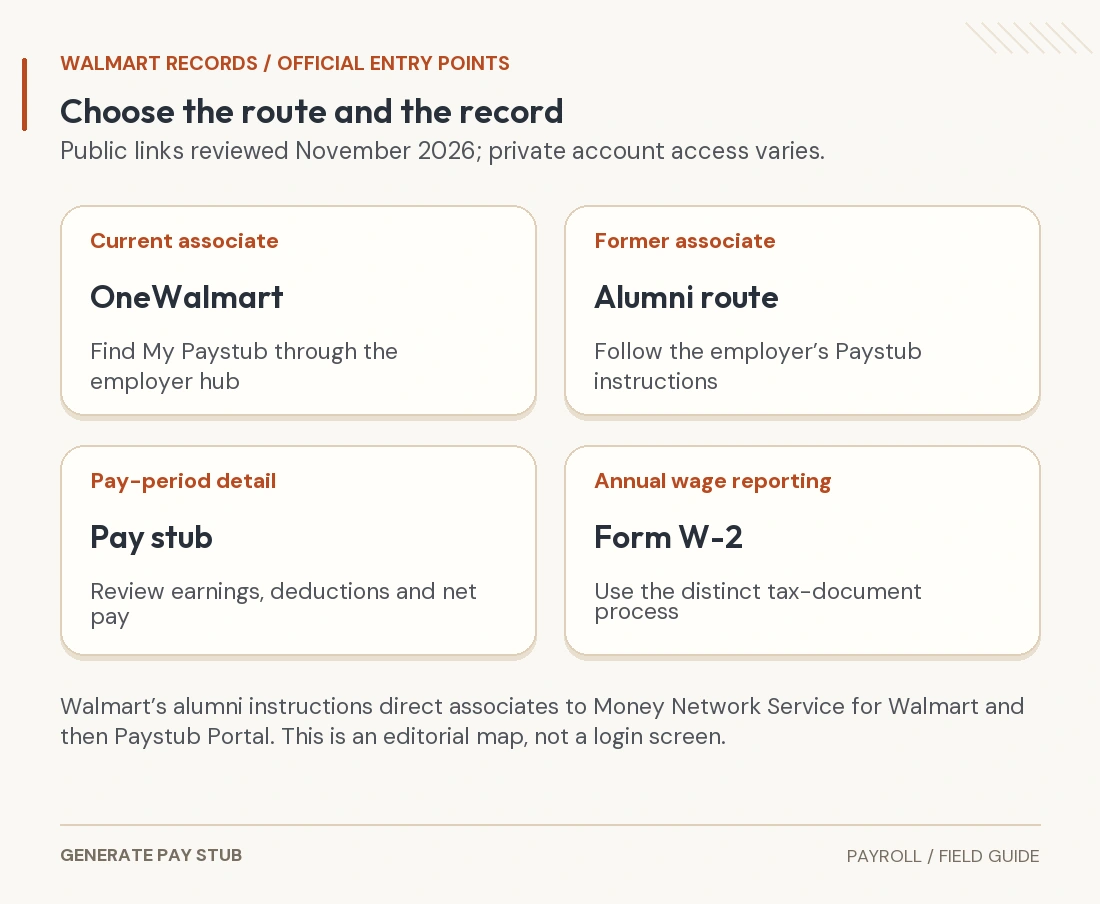
Current Walmart associates can start with the official OneWalmart “My Paystub” route; former associates should use Walmart’s alumni paystub instructions. The alumni page directs associates, including terminated associates, to the Money Network Service for Walmart and its Paystub Portal. Start from the employer’s own link so an unrelated search result does not become your payroll login.
This independent guide reviews the public U.S. access instructions available in November 2026. It does not access an associate’s private account, represent Walmart or guarantee a particular account’s record availability. Local employment arrangements and authentication requirements can differ.
How current Walmart associates can find pay stubs
Use the official OneWalmart My Paystub entry or the employer-provided navigation to My Money and My Paystub. Follow the organization’s sign-in and identity checks. A private payroll page can require authentication even when the surrounding resource hub is public.
Once you are in the approved pay-record service, select the relevant statement or payment date. Confirm that you are viewing a payroll record rather than a projected earnings display, a bank balance or a scheduling summary. Use the available document or print control to retain the complete statement.
If your approved associate app provides a payroll link, it can be a convenient starting point. Follow the app’s actual route and current employer instructions; this guide does not assume every device or role has an identical menu. If a work-network or identity prompt blocks access, use the support process instead of trying to bypass it.
How former Walmart associates can obtain pay stubs
Walmart maintains an official alumni information hub with separate links for paystubs, W-2s and other former-associate matters. Its alumni paystub page gives the following public route:
- Go to Money Network using the link supplied by Walmart.
- Open Login and choose Money Network Service for Walmart.
- Select Paystub Portal.
- Use the existing login, or the registration process offered for a first visit, and follow the account’s prompts.
The Money Network website currently shows a Walmart-specific service choice. The paystub route and the card-management functions are different tasks; choose the function needed for payroll records rather than entering an unrelated enrollment flow.
Do not assume that a former-associate service uses the same credentials as every current-associate application. Use the recovery instructions belonging to that service, and contact the official payroll channel if registration cannot establish your access.

How to download or print a usable Walmart pay stub
Choose the full statement for each period requested. Before saving, check the associate identity, employer details, pay date, period dates, gross earnings, deductions and net pay. Retain all pages if the document spans more than one.
When a PDF or print view is offered, use it to preserve the record’s full context. A phone screenshot can cut off the date, name or deductions, and a displayed balance is not a substitute for the earnings statement. On a shared device, verify the save location and remove any temporary copy after securely moving your own file.
Name files with an unambiguous payment date and keep the original version. If an income-verification recipient wants several recent periods, provide the sequence it requests rather than selecting only the largest paycheck. Ask whether it accepts a redacted copy before concealing fields the recipient needs.
What to do when access fails or a statement is missing
| Problem | Useful check | Appropriate next step |
|---|---|---|
| Current-associate sign-in fails | Correct employer entry point and current identity method | Use the organization’s account-recovery or people/payroll support |
| Former-associate access fails | Alumni paystub route rather than a closed work account | Follow that portal’s recovery process or request payroll assistance |
| One period is missing | Search dates and whether you selected the correct record type | Ask payroll for the precise pay date and record copy |
| Only a small screenshot is available | Document and print controls in the authorized service | Obtain the complete statement before sharing |
| Record opens but pay seems wrong | Hours, earnings lines, deductions and payment | Request a payroll review; a login reset will not correct wages |
A blank screen, blocked popup or download problem is not proof that the wages were not paid. Conversely, an accessible statement does not prove the bank received the net amount. Describe the actual problem to support so account access, document delivery and payment investigation are not confused.
Use employer-provided contacts or the payroll-specialist link on Walmart’s official alumni paystub page. Contact options and hours can change, so consult the current page rather than relying on a telephone number copied into an old third-party guide. Never send a password or one-time security code to someone offering to retrieve the stub for you.
What should you check after opening the statement?
Compare the paid work period with the time records for that period. Review ordinary earnings, any overtime, applicable premiums and separate adjustments. An hourly rate displayed in one field may not explain every earnings line; ask about an unfamiliar code instead of assigning it a meaning from another employer’s statement.
Then trace employee deductions and the net amount. A smaller deposit can result from a different deduction, split payment or earnings adjustment, so compare both statements before assuming the base rate changed. Our pay-stub correction guide helps organize that review.
Paystub YTD wages and W-2 wage boxes can also differ for legitimate tax-base reasons. A W-2 is an annual tax record, not a missing individual pay stub. If you need the annual form, follow the separate W-2 link in the alumni hub; see our final-statement versus W-2 reconciliation guide before comparing totals.
How to request missing records or report a pay error
Provide your name, relevant work location or employing entity, requested pay dates, employment dates and a secure way to receive the documents. Supply employee-identification details only through the employer’s verified process. Do not put a full government identifier in the subject line of an ordinary email.
If the issue is compensation, identify the affected dates and disputed item: missing hours, a rate difference, an adjustment or an unfamiliar deduction. Include supporting time records where appropriate and request an explanation or corrected statement. Keep a record of the request and the response.
For final-pay questions, the applicable jurisdiction and circumstances matter. Do not assume that everyone has an identical final paycheck date, PTO payout or post-employment portal-access window. A portal article cannot establish the wages owed in a particular separation.
Common Walmart paystub questions
Can a former associate still get an official record?
Walmart’s public alumni instructions explicitly include terminated associates in the online paystub route. If the service cannot supply the needed period, ask the official payroll channel about that record rather than creating a substitute claiming Walmart issued it.
Can I use a pay-stub generator to replace an inaccessible Walmart document?
A newly generated document is not the same as an employer-issued record. Obtain the original or an authorized copy for requests that require one. Any personally prepared summary must be accurate, clearly identified and acceptable to the recipient.
Do I need to provide my bank login to retrieve a pay stub?
Wage-statement access is an employer/pay-record task, not a request for your bank password. Follow the official service’s authentication process and ask payroll if an unexpected request appears.