
A final pay stub and Form W-2 answer different questions. The stub describes a payment and usually shows running payroll totals; Form W-2 reports wages and taxes for a calendar year in the categories required for tax reporting. Compare the correct year and the correct fields before treating a difference as a payroll error. In particular, a stub’s year-to-date gross pay is not automatically equal to W-2 Box 1, and neither figure is take-home pay.
“Final” can mean the last regular stub in December or the last stub after leaving a job. Either may be followed by a bonus, adjustment, unused-leave payment, or another payment. For 2026 wages, the IRS’s 2026 Forms W-2 and W-3 instructions are the authority for what the employer reports. This guide uses those instructions and clearly labeled examples; it cannot determine a particular employee’s correct W-2 without the employer’s actual payroll records.
What does each document actually measure?
| Question | Final pay stub | Form W-2 |
|---|---|---|
| Time covered | One payment, its work period, and whatever YTD totals the payroll system displays | Wages paid in the calendar tax year and the related tax reporting |
| Gross and taxable wages | May show cash gross, taxable-wage bases, and benefit deductions as separate lines | Uses specific wage boxes: federal income-tax wages in Box 1, Social Security wages in Box 3, Medicare wages in Box 5 |
| Tax withheld | Current and often YTD withholding lines | Annual federal income tax withheld in Box 2; employee Social Security and Medicare tax withheld in Boxes 4 and 6 |
| Main use | Check a payment against the employer’s payroll records | Use the employer-issued annual wage and tax statement when preparing a tax return |
Form W-2 is prepared by the employer and filed with the Social Security Administration as well as furnished to the employee. A formatted pay stub, including one created from user-entered information, is not a substitute for the employer’s Form W-2. The pay stub is still useful evidence when you ask payroll to explain or correct a discrepancy.
First check the pay date: December work can belong to the next W-2 year
The IRS uses a calendar-year payment basis for Form W-2. Its instructions say W-2 entries must be based on wages paid during the year, not simply the period in which the work occurred. For example, imagine an ordinary cash-wage period of December 20–31, 2026 that is not paid until January 5, 2027. Assuming the employee did not receive the wages earlier, that payment generally belongs on the 2027 Form W-2, despite the 2026 work-period label. The IRS instructions’ calendar-year-basis section makes this distinction explicitly.
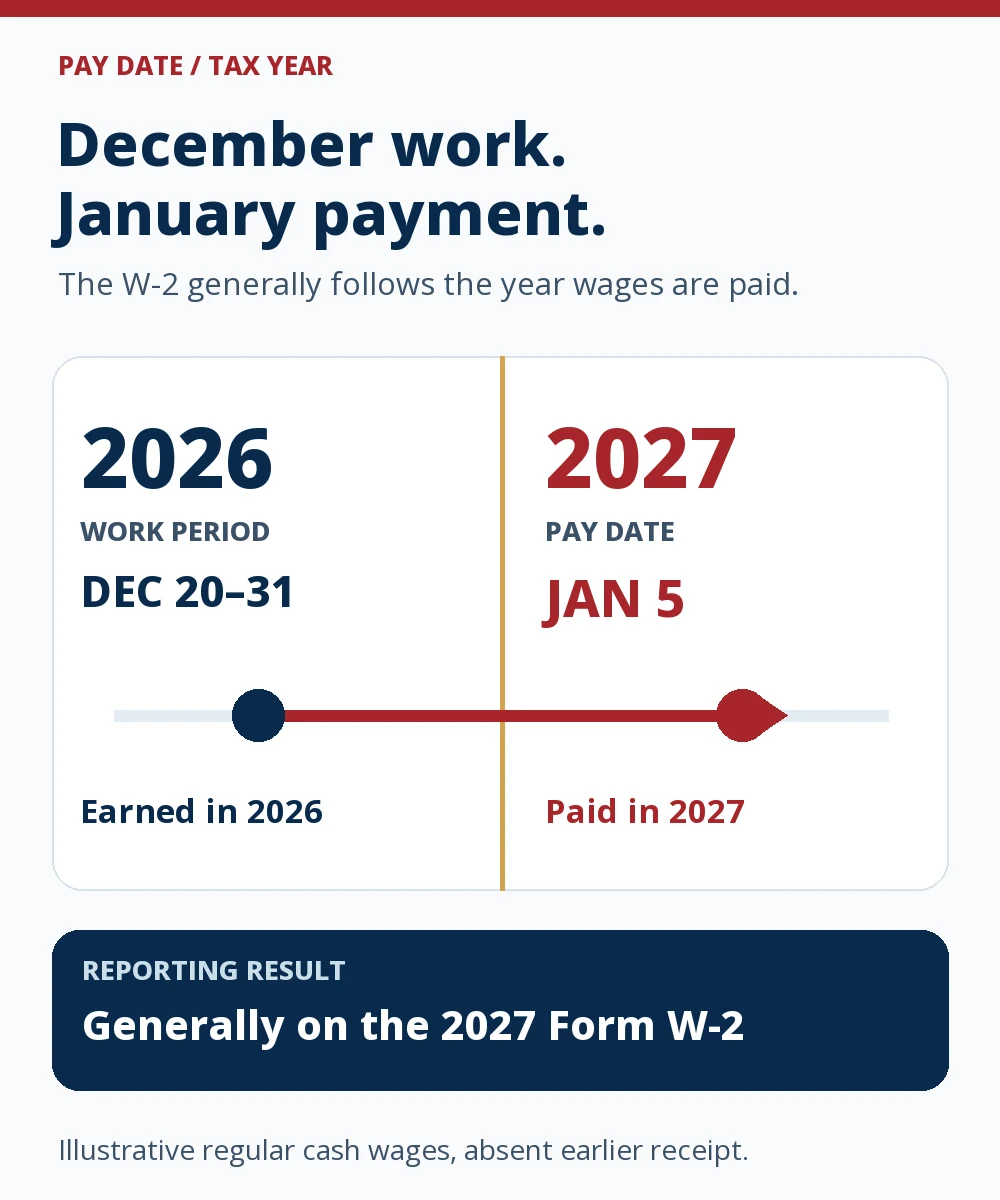
Start a reconciliation by collecting all payments dated January 1 through December 31 for the tax year, including off-cycle checks. Do not simply take a December stub’s YTD total if its last payday was before a later bonus or if its YTD display follows a different convention. A stub showing work performed in December but paid in January should be checked against the following year’s payroll register. Our semi-monthly pay stub guide explains how work-period dates and pay dates can differ on an ordinary statement.
Then compare the right wage bases—not gross pay with Box 1 alone
Box 1 is federal income-tax wages, tips, and other compensation paid during the year. Box 3 is Social Security wages, subject to its annual wage base; Box 5 is Medicare wages and tips, without that Social Security wage-base cap. The three boxes can legitimately differ from one another and from a stub’s cash-gross figure. The 2026 W-2 instructions define the boxes, while the IRS’s retirement-contribution guide explains why a traditional salary deferral can affect Box 1 differently from Boxes 3 and 5.
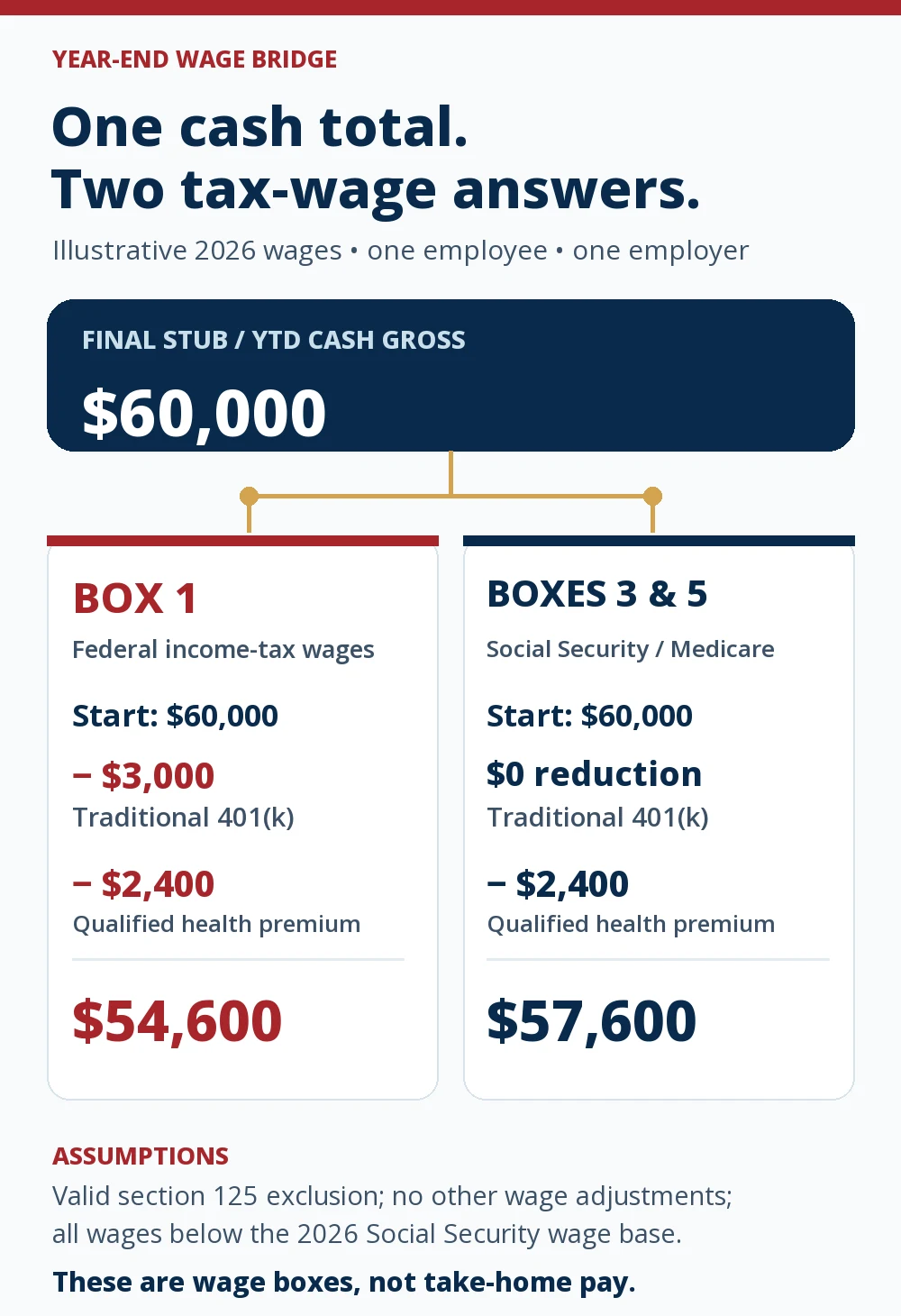
Here is a fictional, limited example for one employee with one employer. Suppose the total cash gross from payments made during 2026 is $60,000. The employee makes $3,000 in traditional pre-tax 401(k) elective deferrals and pays $2,400 in qualified health premiums through a valid section 125 cafeteria plan. Assume no other additions or exclusions, no tips or taxable fringe benefits, and wages below the 2026 Social Security wage base.
| 2026 amount | Calculation in this example | Result |
|---|---|---|
| Cash gross shown in payroll records | Starting amount | $60,000 |
| W-2 Box 1: federal income-tax wages | $60,000 − $3,000 traditional 401(k) − $2,400 qualified health premiums | $54,600 |
| W-2 Box 3: Social Security wages | $60,000 − $2,400 qualified health premiums; the traditional 401(k) deferral remains included | $57,600 |
| W-2 Box 5: Medicare wages | Same calculation as Box 3 under these assumptions | $57,600 |
The traditional 401(k) amount is normally reported separately in Box 12, code D; it is not a second amount to subtract from Box 1 after Box 1 is already calculated. The IRS’s 2026 fringe-benefit guide explains the treatment of qualifying cafeteria-plan benefits. This example does not say that every health deduction is pre-tax or that every pay stub’s “gross” line is defined identically. Check the actual plan and payroll coding.
Which differences need more investigation?
The simple subtraction above is a starting model, not a universal formula. Ask payroll for a wage-basis reconciliation when any of these apply:
- Roth versus traditional deferrals. A designated Roth 401(k) deferral generally remains in Box 1, unlike a traditional pre-tax elective deferral. Both remain in Social Security and Medicare wages. The IRS contribution comparison separates these treatments. Do not subtract every line labeled “401(k)” from Box 1.
- Qualified benefits versus other deductions. A valid cafeteria-plan health premium can reduce multiple federal wage bases; an after-tax deduction usually does not. An HSA deduction’s treatment depends on how it is made and whether it qualifies. Ask for the plan and payroll code rather than guessing from the label. Publication 15-B describes relevant benefit exclusions.
- Taxable noncash compensation or adjustments. Some benefits can be taxable wages even when the employee received no extra cash in the final paycheck. The W-2 instructions require taxable fringe benefits in the applicable wage boxes. An off-cycle correction can also change annual totals after the last regular stub.
- Social Security wage-base limit. For 2026, the IRS instructions set the Social Security wage base at $184,500; Box 3 wages are capped, while Box 5 Medicare wages have no comparable cap. The $57,600 example is below that threshold. Tips and other special situations can require additional boxes or different treatment.
- State or local wages. State wage and withholding boxes follow the relevant jurisdiction’s rules; a state wage figure need not match federal Box 1. Compare the specific state’s payroll records and instructions rather than transferring the federal formula automatically.
Another common misread is Box 12, code DD. Where this coverage-cost reporting applies, the IRS says it is informational and not taxable income. It is not necessarily the employee’s own premium deduction. See the IRS explanation of employer-sponsored coverage reporting. Our gross pay versus taxable wages guide provides a simpler introduction to why payroll uses several wage bases.
For 2026 W-2s, the IRS instructions also introduce Box 12 code TP for cash tips reported to the employer and code TT for the qualifying overtime premium portion. These are additional reporting entries, not amounts to subtract automatically from Box 1 when comparing the stub. The IRS says overtime compensation is generally still subject to federal income-tax withholding and Social Security and Medicare taxes. Check tip and overtime records separately if either code applies; code TT is not the entire overtime paycheck amount.
How to compare withholding without mixing it with income
Use the final stub’s paid-year payroll record to compare withholding, keeping tax types separate:
- W-2 Box 2 is federal income tax withheld from wages for the year. Compare it with the sum of the payroll system’s federal income-tax withholding for those payments, not with Box 1 or the employee’s eventual tax bill. The IRS Box 2 instruction defines this figure.
- Boxes 4 and 6 report employee Social Security and Medicare tax withheld. Compare them with their own YTD withholding categories, accounting for applicable wage-base and special tax rules; do not compare them to the employer’s share of payroll taxes.
- State and local withholding belongs with the corresponding state or locality on the W-2. A worker with multiple work locations may see more than one state entry.
Withholding is money paid toward tax during the year, not a statement of final tax liability. An apparently low or high Box 2 needs a record-backed review, not an edit to the W-2 PDF or a replacement pay stub.
A record-backed reconciliation in six steps
- Confirm the tax year and employer. Match the W-2 year, employer name and EIN, and the employee’s identifying information. If you worked for two employers, compare each employer’s W-2 with that employer’s payments.
- Build the paid-year list. Gather every regular and off-cycle payment with a pay date in that year. Note bonuses, final wages, paid leave, and adjustments. Keep work-period dates separate from pay dates.
- Check the payroll totals. Reconcile cash gross and each withholding category to the employer’s payroll register and the stubs. If a displayed YTD figure stops before the last payment, add that payment from the source record.
- Rebuild each wage base. Ask which items reduce Box 1, which reduce Boxes 3 and 5, and which taxable items are added. Use the benefit and retirement-plan classifications actually on file.
- Compare W-2 boxes individually. Check Boxes 1, 2, 3, 4, 5, and 6, then applicable Box 12 codes and state/local boxes. Do not force one gross figure to equal every box.
- Request a written explanation or correction. Give payroll the tax year, pay dates, specific box, expected amount, and supporting records. If an issued W-2 is wrong, the employer’s correction process may require Form W-2c; the IRS correction instructions describe that form.
Save the employer’s response and any corrected statement with the payroll records. Our Pay Stub Help 101 guide explains how to trace YTD lines across ordinary pay statements. Creating a new pay stub with a changed number does not correct an employer-filed W-2.
If the W-2 has not arrived or is wrong
For wages paid in 2026, the IRS instructions set February 1, 2027, as the general deadline to furnish employee W-2 copies. January 31, 2027, is a Sunday. An employee who left before year-end can request the completed W-2; the IRS instructions describe the employer’s timing for that request.
If the form is missing or incorrect, contact the employer first. The IRS’s missing-or-incorrect W-2 guidance describes when to contact the IRS and how Form 4852 may be used as a substitute if the correct W-2 cannot be obtained in time to file. Pay stubs can help estimate amounts for that process, but filing directly from an unverified final stub is not the ordinary route. If a corrected W-2 arrives after a return was filed using incorrect information, follow the IRS instructions on amending the return.
Common questions
Should the last pay stub’s YTD gross equal W-2 Box 1?
Not necessarily. First confirm both cover wages paid in the same calendar year. Then account for qualifying pre-tax deductions and taxable additions. Box 1 is federal income-tax wages, not net pay and not always the stub’s cash gross.
Why might Box 3 or Box 5 be higher than Box 1?
A traditional pre-tax 401(k) elective deferral generally reduces Box 1 while remaining in Social Security and Medicare wages. Other differences depend on the plan and compensation. In high-income cases, Box 3 can instead be lower than Box 5 because of the Social Security wage base.
Can I use the last pay stub to file before my W-2 arrives?
Wait for the employer-issued W-2 and pursue a missing or corrected form with the employer. If it cannot be obtained in time, the IRS provides a specific Form 4852 procedure using estimates supported by records. A pay stub by itself is not an employer-filed W-2.
What if my final paycheck was issued after I left the job?
Include the payment in the calendar year in which it was paid for the usual W-2 year test. Check the pay date and any later adjustments rather than assuming the termination date or work-period end decides the tax year.