The South Carolina paycheck calculator follows the currently published 2026 WH-1603F employer formula using your SC W-4 allowance count and extra withholding. Zero allowances remove both the formula’s allowance reduction and its standard deduction. The payroll formula is different from the annual income-tax rules changed by H.4216.
This guide compares a fictional $72,000 monthly salary under zero and one supported allowance. It explains the $61 monthly withholding difference, how to check the state certificate and why the displayed annual amount is not a final 2026 return calculation.
Separate published payroll guidance from the annual tax changes
SCDOR’s current withholding page links its 2026 employer formula and certificate. The calculator uses that payroll method. Do not substitute a final-return rate into one step while leaving the rest of the withholding formula intact.
The agency’s H.4216 explanation describes changes effective for tax year 2026, including the annual rate structure, an AGI starting point and a South Carolina Income Adjusted Deduction. It lists 1.99% below $30,000 and 5.21% less $966 at $30,000 and above, with additional deduction rules.
Those return changes do not turn the existing employer formula into a final-liability calculator. This article reproduces the formula still linked on the withholding page as reviewed November 6, 2026. A final return requires the new annual rules and the taxpayer’s complete facts.
When reviewing a payroll discrepancy, identify the employer’s current method and any updated official guidance. A withholding forecast alone cannot promise a refund or determine a balance due.
Read the SC W-4 allowance and extra fields
The 2026 SC W-4 places the allowance total on line 5 and additional tax per paycheck on line 6. Its worksheets address personal circumstances, deductions, adjustments and additional income.
The count is a state election. It is not the same as federal annual credit dollars and does not automatically equal the number of children. Follow the applicable worksheet and keep the supporting record.
The state calculator exposes a count and extra amount rather than separate Single and Married percentage tables. Filing circumstances are reflected through the state worksheet, while federal status remains a separate input.
We compare zero with one to explain the formula’s behavior. Either count must be supported in the person’s actual situation; the higher-cash result is not a reason to claim an unsupported allowance.
Set the $6,000 monthly salary comparison
Use the South Carolina paycheck calculator, select 2026 and enter $72,000 annual gross with Monthly selected. That creates twelve equal $6,000 wage payments.
Federal status is Single. Leave multiple jobs off and all federal dollar adjustments at zero. Start with zero SC W-4 allowances and no extra state withholding; leave known annual local and other deductions at zero.
Save that result, then change only the state count to one. Assume ordinary wages with one employer, full-year South Carolina residence and work, no pre-tax benefits and equal federal, state and FICA wage bases.
This design tests the state formula. It does not represent the full household worksheet of every employee earning that salary.
Understand why zero allowances remove two deductions
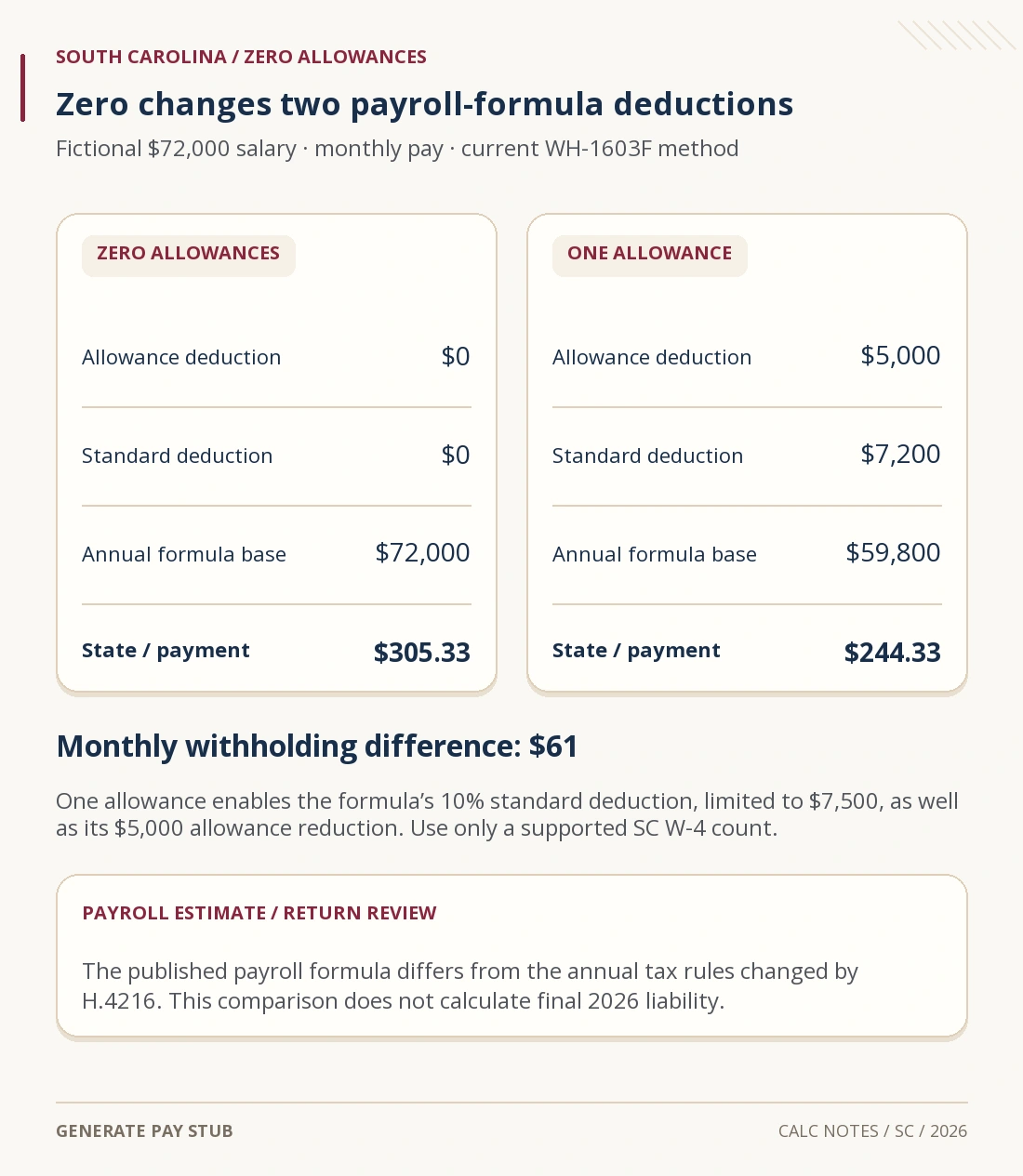
The published 2026 WH-1603F formula allows $5,000 annually per claimed allowance. With at least one allowance, it also subtracts 10% of gross wages, up to a $7,500 maximum. With zero allowances, both deductions are zero.
At $72,000, 10% is $7,200, which is below the cap. One allowance therefore produces a combined formula reduction of $5,000 + $7,200 = $12,200.
The one-allowance base is $72,000 − $12,200 = $59,800. The zero-allowance base remains $72,000. Treating zero as merely one fewer $5,000 reduction would miss the standard-deduction change.

Verify the two state withholding results
Both bases fall in the formula’s upper payroll band: $437.70 plus 6% of the excess over $18,230.
With zero allowances: $437.70 + ($72,000 − $18,230) × 0.06 = $3,663.90. Divide by 12 to get $305.325, rounded to $305.33.
With one allowance: $437.70 + ($59,800 − $18,230) × 0.06 = $2,931.90. Dividing by 12 gives $244.325, rounded to $244.33.
| Output measured | Zero allowances | One allowance |
|---|---|---|
| Monthly state amount withheld | $305.33 | $244.33 |
| Monthly cash in this example | $4,651.50 | $4,712.50 |
| Sum of 12 state deductions | $3,663.96 | $2,931.96 |
| Sum of 12 cash payments | $55,818.00 | $56,550.00 |
The recurring difference is $61 monthly, or $732 across twelve payments. That also equals $12,200 × 6% because both cases remain in the same band and round correspondingly.
The annual tool sums rounded checks, explaining the six-cent difference from either unrounded annual formula. Federal withholding and FICA stay unchanged between these two state-only tests.
Reconcile the one-allowance annual cash estimate
| Projected annual wage or deduction | Amount |
|---|---|
| Gross salary used for the estimate | $72,000.00 |
| Federal withholding on wages | $7,010.04 |
| South Carolina payroll withholding | $2,931.96 |
| Employee Social Security | $4,464.00 |
| Employee Medicare | $1,044.00 |
| Cash before unmodeled deductions | $56,550.00 |
The monthly reconciliation is $6,000 − $584.17 federal − $244.33 state − $372 Social Security − $87 Medicare = $4,712.50.
Other payroll items can reduce that amount or change the tax bases. Our net-pay reconciliation guide explains how to compare a statement with a calculation without losing separate benefit deductions.
Review household changes and omitted payroll facts
SC W-4 instructs employees with multiple jobs or working spouses to review each employer’s certificate, including whether to concentrate allowances on the highest-paying job and add withholding. A one-job estimate cannot determine the combined household outcome.
Line 6 is per paycheck. For example, $13 extra monthly adds $156 over twelve unchanged payments. It is separate from a $13 annual adjustment or federal extra.
A withholding exemption requires its own certificate conditions. The ordinary count-and-extra controls cannot validate an exemption, military domicile election or nonresident allocation.
If benefits reduce taxable wages, identify the correct base before using the wage estimate. General annual cash fields do not determine pre-tax eligibility. Use the deduction wage-base explanation when reviewing those items.
The agency’s withholding update encourages review after law changes and significant life events. Revisit the actual certificate and year-to-date records rather than choosing an allowance count solely from one estimated paycheck.
South Carolina paycheck calculator questions
Why is the zero-to-one allowance change larger than expected?
It enables the formula’s standard deduction as well as its allowance reduction.
Is the 6% payroll band the final 2026 income-tax rate?
No. H.4216 changed the annual tax rules; the employer formula serves a different calculation.
Does a larger paycheck mean lower final tax?
No. It may reflect lower prepaid withholding.
Can the tool submit my new SC W-4?
No. Give the completed certificate to the employer through its payroll process.
Current South Carolina employer guidance, annual-law distinction and both live examples reviewed November 6, 2026.