To test a W-4 change with a federal withholding calculator, keep the payment amount and schedule fixed, then change one election at a time. Compare the federal withholding line after each run. Annual credits, annual income adjustments and extra withholding per payment do different jobs, so entering the same dollar amount in different fields can produce very different results.
This walkthrough uses the free Generate Pay Stub federal tool, a fictional $7,200 monthly taxable payment and the 2026 payroll rules. It explains both calculation modes, checks a five-run example and shows where a simple payroll estimate stops being sufficient.
Choose the mode before entering a wage amount
The free federal withholding calculator supports 2025 and 2026. In annual wages mode, enter the year’s expected federal taxable wages and select the usual frequency. The tool spreads that total over the selected schedule, calculates each modeled payment and adds the results.
In one paycheck mode, enter the federal taxable wages for that payment. The tool still needs the frequency because the regular percentage method annualizes the payment when looking up withholding. Monthly $7,200 and biweekly $7,200 represent different annualized earnings, even though the entered payment amount is identical.
For the example here, select 2026, one paycheck, Monthly and Single, then enter $7,200. The frequency corresponds to 12 modeled payments a year. No state selection or prior-year-to-date wage entry is needed to calculate this federal component.
If you want federal, state, Social Security and Medicare deductions combined, open the state paycheck calculator directory instead. A federal-only result cannot tell you the total amount your employer will deposit.
Map each W-4 election to the right calculator field
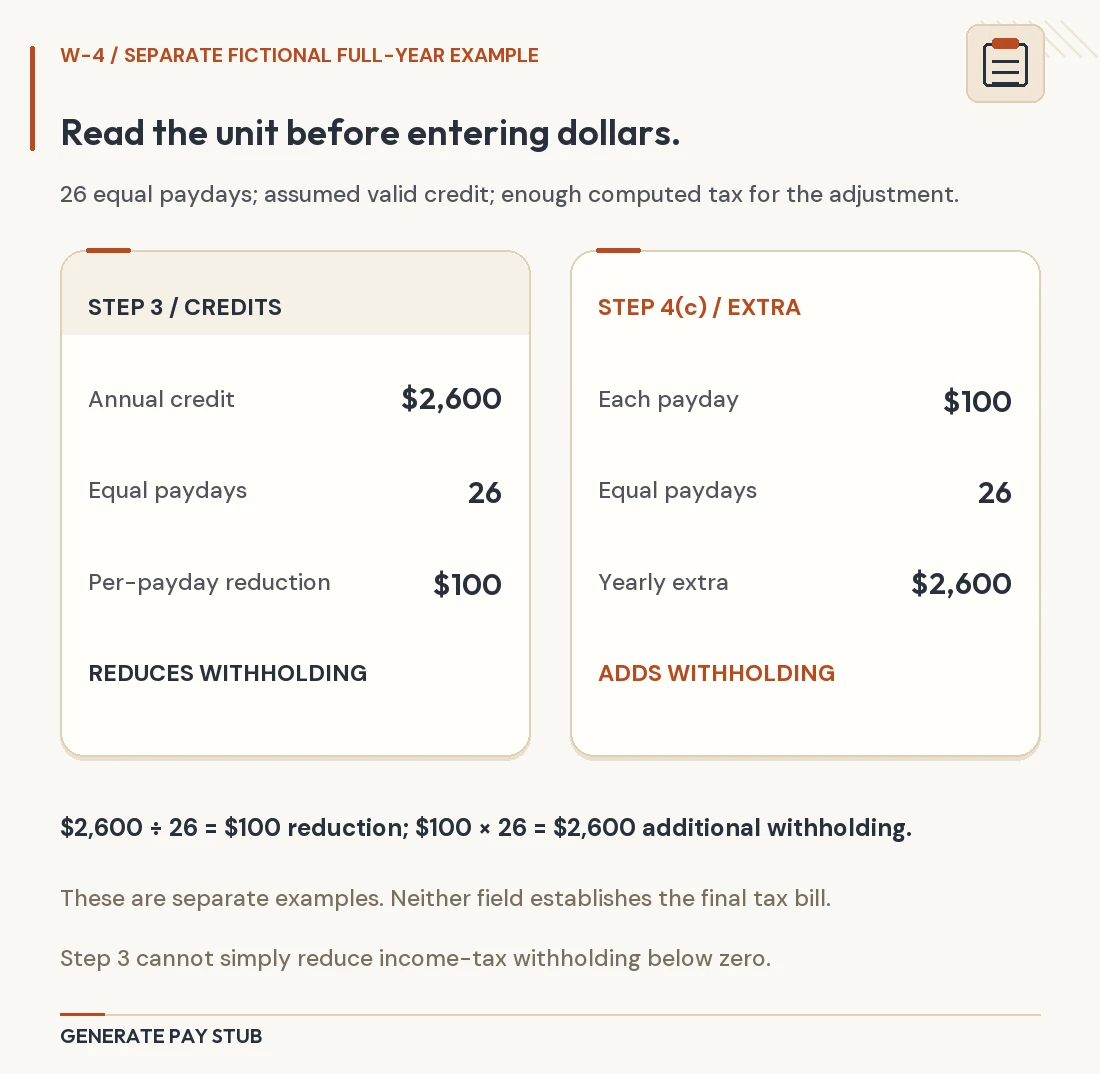
Use elections from a modern, 2020-or-later W-4. The 2026 Form W-4 and its instructions distinguish annual Step 3 credits, annual Step 4(a) other income and annual Step 4(b) deductions from the extra amount requested on every payment in Step 4(c).
- Filing status: use the applicable W-4 selection. A filing choice is not an income amount.
- Multiple-jobs checkbox: model Step 2(c) only when following that method’s instructions; it selects a different withholding schedule.
- Annual credits: reduce the calculated annual withholding amount before it is converted to the payment’s share, subject to a zero floor.
- Annual other income: adds to the wage amount used by the withholding worksheet. It does not claim that your employer paid you that additional income.
- Annual deductions: reduce the worksheet wage amount. Enter the Step 4(b) election, not your entire household spending or an assumed standard-deduction figure.
- Additional withholding: adds the requested dollars to this payment’s federal withholding after the earlier adjustments.
The calculator models those elections; it does not establish eligibility for a credit, deduction or filing status. Use the form’s worksheets or the official estimator when deciding what belongs on your actual certificate. Our W-4 article covers the certificate decision separately.
Five runs: see exactly which setting changes the result
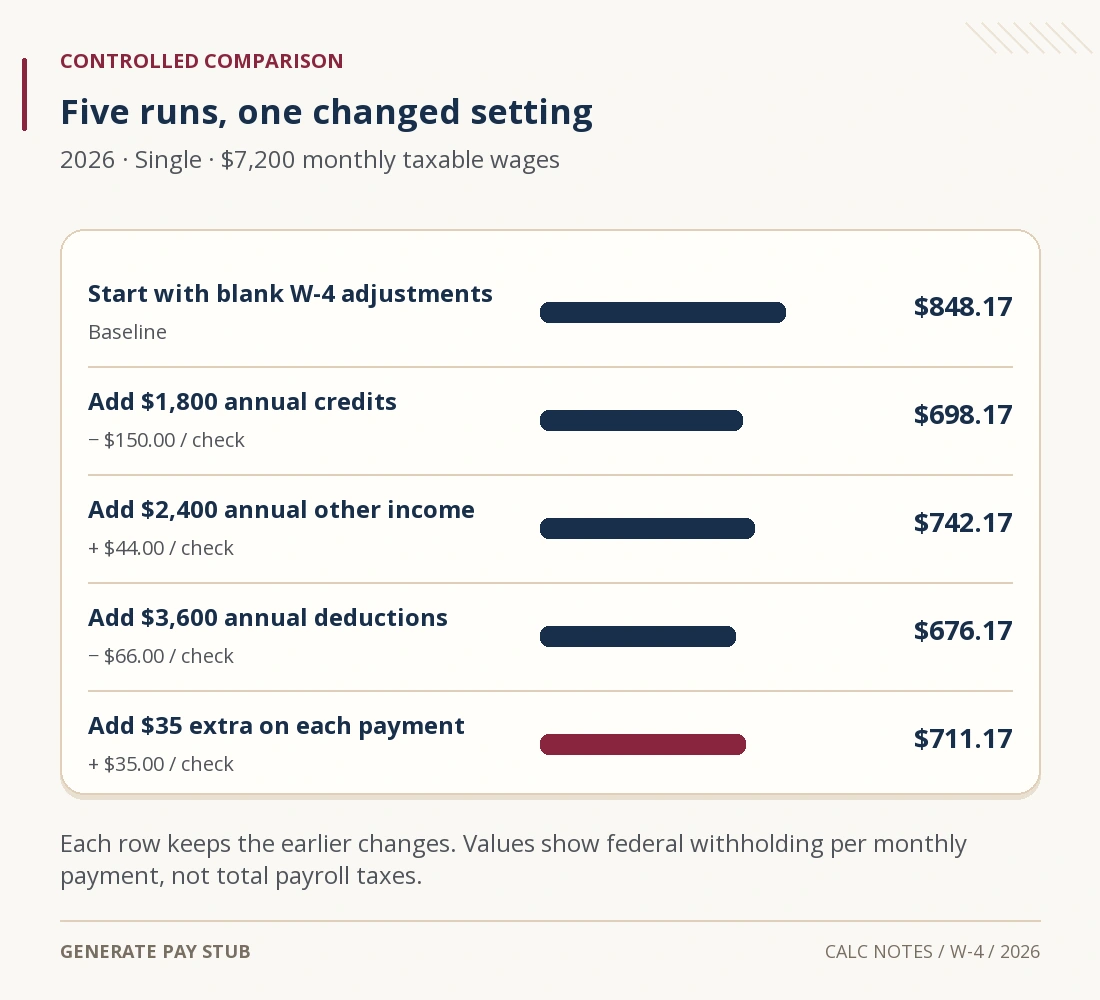
Begin with all four dollar adjustments at zero and leave the multiple-jobs checkbox unselected. For each new run, retain the previous changes. The annualized wage is $86,400 throughout; the actual modeled payment remains $7,200. These are demonstrations of the controls, not recommended elections for a real taxpayer.
| Run and newly added setting | Withholding this payment | Change from previous run |
|---|---|---|
| 1. Start with zero adjustments | $848.17 | — |
| 2. Add $1,800 annual credits | $698.17 | −$150.00 |
| 3. Also add $2,400 annual other income | $742.17 | +$44.00 |
| 4. Also add $3,600 annual deductions | $676.17 | −$66.00 |
| 5. Also add $35 extra per payment | $711.17 | +$35.00 |

The credit demonstration reduces each monthly estimate by $1,800 ÷ 12 = $150. The other-income and deduction effects in this particular example use a 22% marginal worksheet row: $2,400 × 22% ÷ 12 = $44, while $3,600 × 22% ÷ 12 = $66. Those are changes to withholding, not amounts added to or removed from the employee’s cash wages.
The last $35 is different: it is already a per-payment instruction, so it adds $35 directly. Entering $420 there because $35 × 12 = $420 would ask for $420 on each modeled monthly payment. That unit error would add $5,040 across 12 payments instead of the intended $420.
Do not extrapolate the 22% effect to every income or every adjustment. An entry can cross a worksheet boundary or bring calculated withholding to zero. Rerun the calculator for the actual input combination instead of assuming a fixed percentage change.
Check the final $711.17 result by hand
The current tool uses Worksheet 1A from 2026 IRS Publication 15-T. In this Single example with Step 2(c) off, the adjusted annual wage calculation is $86,400 + $2,400 − $3,600 − $8,600 = $76,600. The $8,600 is a worksheet adjustment already applied by the method; do not enter it again in the deductions field.
The applicable annual percentage row gives $5,800 + 22% × ($76,600 − $57,900) = $9,914. After the $1,800 annual credit, $8,114 ÷ 12 = $676.1666…; adding $35 gives $711.1666…, which rounds to $711.17 for this payment.
To test the corresponding year, switch to annual mode and replace $7,200 with $86,400 while retaining the same monthly frequency and elections. The checked live result is $8,534.04 across 12 modeled payments. That is $711.17 × 12. It differs by four cents from an unrounded annual shortcut because the tool sums rounded payment amounts.
This cross-check is useful because it catches two common errors at once: retaining a single-payment amount in annual mode, and treating extra withholding as an annual input. It does not turn the result into a return calculation.
What this federal estimate leaves out
The dollar result is employee federal income tax withholding only. It excludes state and local taxes, FICA deductions, benefits, garnishments, employer payroll costs and other cash adjustments. Federal taxable wages can also differ from the gross-pay line because benefit and compensation rules vary; use the correct wage base rather than assuming every amount on the statement is interchangeable.
The tool’s modern W-4 workflow does not reproduce every payroll arrangement. Historical certificates, nonresident-alien adjustments, exemption eligibility and special payment methods need separate treatment. A bonus payment, for example, is not necessarily processed under the regular-wage method demonstrated here. Do not interpret an unusual result as proof that the employer’s method is incorrect.
Withholding is a payment toward income tax. The IRS explanation of tax withholding distinguishes money withheld during the year from the tax ultimately determined on a return. A lower withholding result means more cash remains in this payment, but it does not by itself reduce the tax you owe for the year.
Compare the estimate with payroll before changing an election
If a regular paycheck differs, gather the payment’s federal taxable wages, frequency, active W-4 settings and any supplemental or correction lines. Recreate those facts first. A net-pay discrepancy cannot be diagnosed from the federal line alone; use the full take-home-pay reconciliation for that question.
A midyear change needs a second kind of check. This calculator does not collect how much you have already paid or withheld during the year, a spouse’s earnings, every other job or a complete tax-return profile. The IRS Tax Withholding Estimator is designed for a broader withholding review using current records. A target spread over five remaining payments is different from the same target spread over 12.
After deciding on the appropriate elections, deliver the actual W-4 through your employer’s payroll process. Keep the calculator settings with your comparison notes and inspect a later statement to see whether the new election has taken effect. Trying a scenario on this website does not update employer records.
Questions about federal withholding estimates
Why does the tool ask for frequency in one-paycheck mode?
The percentage method uses the frequency to annualize a regular payment and convert the worksheet result back to that payment. The mode identifies what the wage entry represents; the schedule supplies the number of periods.
Will a $1,000 deduction reduce withholding by $1,000?
A worksheet wage deduction changes the amount to which the withholding schedule applies. It does not ordinarily subtract the full $1,000 from withholding. An annual credit has a different effect, subject to the worksheet’s limits.
Can I use this tool to find my refund?
No. It models a payroll withholding component under the settings you enter. A refund or remaining balance requires a broader accounting of return liability and payments.
Does a zero result mean the wages are tax-free?
No. Credits or other elections can bring the modeled withholding to zero without establishing that the wages are excluded from income or that no tax will be due.
Live controls, six calculator results and official references checked November 6, 2026. The worked comparisons apply to regular US employee wages under the stated 2026 assumptions.