The Texas paycheck calculator estimates federal deductions even though Texas has no personal state income tax. Enter the annual wage amount, choose the pay schedule and review federal W-4 settings. A zero Texas income tax line does not make gross wages equal the amount deposited.
This 2026 guide compares weekly, biweekly, semimonthly and monthly estimates for the same fictional $62,400 salary. It shows what changes when payments are divided differently, why annual estimates can differ by a few cents and which real-payroll details need a separate review.
Enter an annual wage amount in the Texas calculator
Open the free Texas paycheck calculator. Choose 2026 and enter $62,400 as annual gross wages. Start with Monthly pay and Single federal filing status. For the controlled example, leave the multiple-jobs checkbox off and set annual credits, other income, deductions and additional federal withholding to zero.
The Texas page has no additional state certificate fields for its ordinary same-state wage scenario. It also lists no additional supported statewide employee contribution in the reviewed program section. Read the result’s assumptions rather than interpreting that display as a guarantee that every possible real-world deduction is zero.
We assume one employer, a full year of ordinary wages, Texas residence and work, and no benefits, local withholding or other deductions. Every wage dollar in this example is subject to the ordinary federal and FICA rules. Select the correct year for your own wages; both 2025 and 2026 are currently available.
If you are starting with an hourly offer, build the annual wage estimate from expected paid hours first. An hourly rate by itself does not belong in an annual wage field. Variable hours, overtime or unpaid weeks will require more specific earnings assumptions.
A checked monthly example: $5,200 gross becomes $4,359.87
Dividing $62,400 across 12 monthly payments gives $5,200 gross per payment. Under the stated 2026 elections, the live tool returns:
| Component | Monthly payment | Annual projection |
|---|---|---|
| Gross wages | $5,200.00 | $62,400.00 |
| Federal income tax withholding | $442.33 | $5,307.96 |
| Employee Social Security | $322.40 | $3,868.80 |
| Employee Medicare | $75.40 | $904.80 |
| Texas personal income tax | $0.00 | $0.00 |
| Estimated take-home | $4,359.87 | $52,318.44 |
The payment check is $5,200 − $442.33 − $322.40 − $75.40 = $4,359.87. The annual projection sums those 12 payments. This estimates take-home pay before any deductions omitted by the assumptions; it does not establish a final income tax bill.
Social Security is $5,200 × 6.2% = $322.40, and regular Medicare is $5,200 × 1.45% = $75.40. The annual wages here remain below both the 2026 Social Security wage base of $184,500 and the employer’s $200,000 Additional Medicare withholding trigger. IRS Topic 751 provides these ordinary employee rules.
Compare four schedules without changing the salary
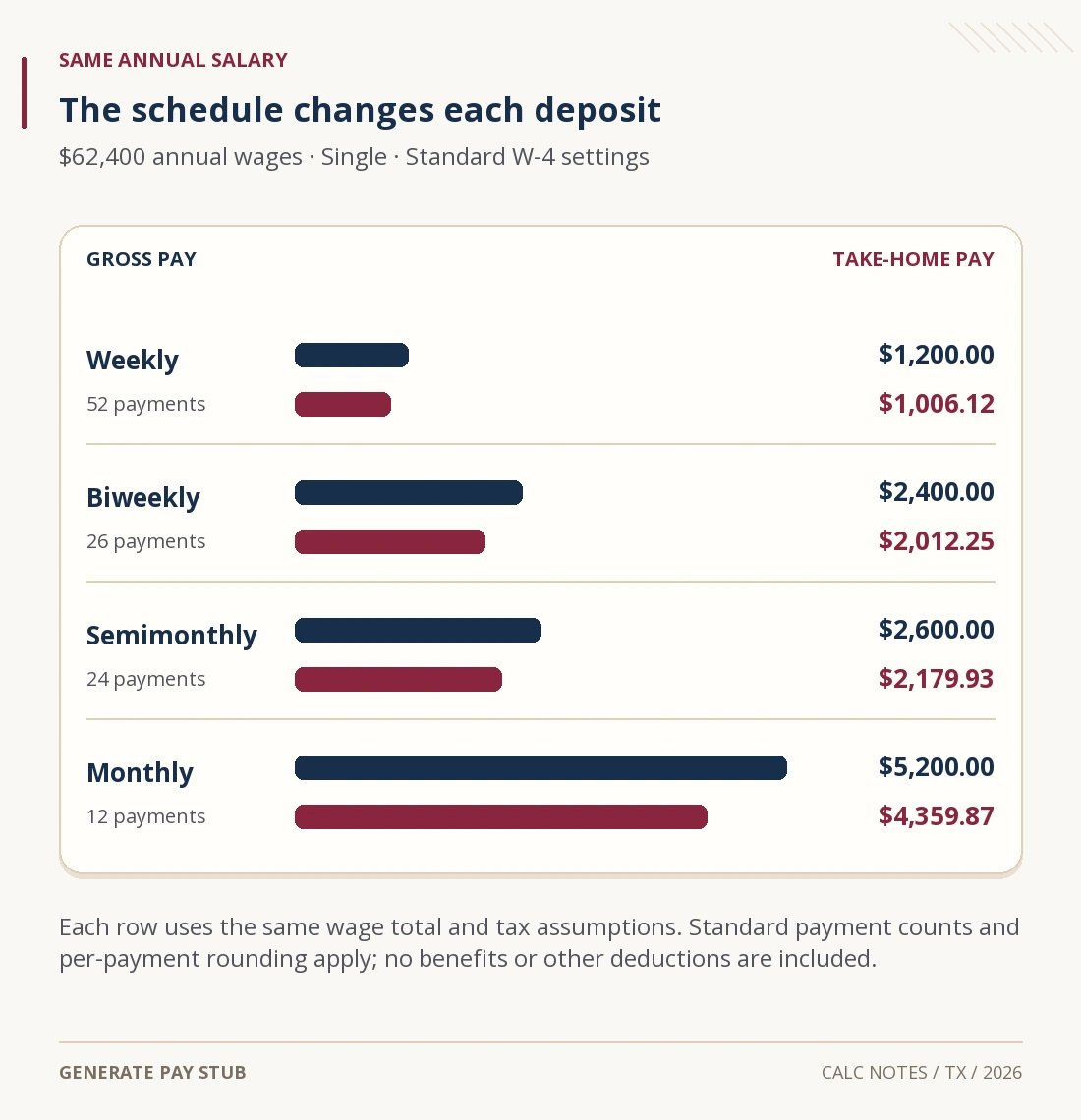
Keep $62,400 and the same federal elections, then change only the frequency. The following figures are checked live outputs. The standard counts are 52 weekly, 26 biweekly, 24 semimonthly and 12 monthly payments; compare them with the employer’s actual payday calendar before relying on a year total.
| Schedule | Gross each payment | Net each payment | Annual estimated net |
|---|---|---|---|
| Weekly: 52 payments | $1,200.00 | $1,006.12 | $52,318.24 |
| Biweekly: 26 payments | $2,400.00 | $2,012.25 | $52,318.50 |
| Semimonthly: 24 payments | $2,600.00 | $2,179.93 | $52,318.32 |
| Monthly: 12 payments | $5,200.00 | $4,359.87 | $52,318.44 |

A $2,179.93 semimonthly estimate is larger than a $2,012.25 biweekly estimate because the same salary is spread over 24 rather than 26 payments. That is not an annual raise. Similarly, comparing $1,200 weekly with $2,600 semimonthly requires annualizing the gross figures: $1,200 × 52 and $2,600 × 24 both equal $62,400.
For a biweekly budget, two of these estimated payments provide $4,024.50 and three provide $6,036.75. A monthly average does not tell you which calendar months receive the extra payday. Use your pay calendar and our frequency comparison guide when planning bill dates.
Why are the annual net estimates a few cents apart?
The annual results above range from $52,318.24 to $52,318.50, a 26-cent spread. The controlled inputs have not created a meaningful tax saving. Each frequency changes how the regular withholding calculation is converted into payment amounts and rounded.
Under 2026 IRS Publication 15-T, this Single example’s annualized worksheet amount is $62,400 − $8,600 = $53,800. The applicable row gives $1,240 + 12% × ($53,800 − $19,900) = $5,308 before conversion to a payment amount.
Monthly withholding rounds to $442.33; multiplying by 12 yields $5,307.96. Weekly withholding rounds to $102.08; multiplying by 52 yields $5,308.16. The calculator sums payment amounts instead of forcing every schedule back to the same unrounded annual shortcut. Tiny differences of that kind should be investigated as rounding and method questions, not described as a benefit of being paid more frequently.
Your actual payments may also vary with earnings, corrections or wage limits. A standardized projection does not establish the precise number or size of payments an employer owes under a particular agreement.
What does the zero Texas income tax line mean?
The Texas Governor’s economic development office confirms that Texas has no personal income tax. For this ordinary Texas-only employee example, the calculator therefore shows zero state personal income tax withholding.
That does not remove federal income tax, Social Security or Medicare. It also does not turn the employer’s own payroll costs into employee deductions. For example, Texas Labor Code sections 204.002 and 204.003 assign unemployment contributions to the employer and prohibit deducting those contributions from an employee’s wages.
An item labeled “state” on a real payroll record still needs identification. It could relate to work or residence in another state, a correction or another payroll item. The calculator cannot identify that item from its label or decide multi-state taxation.
Check benefits, other deductions and work location before using the net figure
The basic Texas projection uses the same gross-wage starting amount for federal and FICA purposes. Actual pre-tax benefits can create different wage bases. The tool does not calculate those benefit elections; review the federal, Social Security and Medicare wage lines in your records.
The known local-tax and other-deduction controls accept annual cash amounts. They do not discover local tax rules or change taxable wages. Entering a pre-tax insurance or retirement amount there as if it were a complete tax calculation can produce a misleading estimate. The calculator input walkthrough explains this limitation.
A deduction you enter for planning also does not establish legal authorization to take it from wages. The Texas Workforce Commission deduction summary distinguishes required deductions from other deductions needing lawful, specific authorization. Check the actual payroll agreement and applicable rules rather than using a calculator field as permission.
For remote work, a move, another state’s employment or a partial year, the same-state full-year assumptions may not fit. This tool also does not reproduce every bonus, tip, irregular-pay or specialized coverage arrangement. Start a payroll inquiry with the specific wage base or deduction that differs, using our net-pay checking guide.
Texas paycheck calculator questions
Can I ignore the W-4 because Texas has no income tax?
No. Federal income tax withholding still depends on federal elections and wages. State personal income tax and federal withholding are separate questions.
Is biweekly the same as twice a month?
No. The tool’s biweekly setting uses 26 periods; semimonthly uses 24. Select the schedule described by the employer rather than the label that produces the larger individual payment.
Does this calculator cover self-employment taxes?
These examples concern employee wages. An independent contractor’s income and self-employment tax planning require a different calculation.
Where can I compare another state’s estimate?
Use the free state calculator directory and read the selected state’s elections and assumptions. A comparison can inform a budget without determining residency or wage sourcing.
Texas references, federal payroll rules and four live schedule scenarios checked November 6, 2026. All amounts describe the fictional 2026 salary and stated elections.